Treat URL as state
Have you ever navigated a website, done some things like opening folders, switching between tabs, then clicked on the back button and got pushed back to the previous website you no longer care about?
Recently I've encountered the same case: I click links in the navigation menu, press the back button to go to the previous page and for whatever reason I get navigated to an empty tab.
That sucks. Users get frustrated when this happens. I get frustrated when that happens. Users don't want to go back again and repeat the same things just to get to the desired state.
We can do better. Our job as developers is to reduce the frustration users encounter every day. Users should not feel overwhelmed while using your web app. That's where search params come into the game.
It's easy to put everything in a local (or even worse, global) state and move on. In reality, you should consider the following:
- Can the user share a link?
- Are we updating the entire UI based on the user's selection?
- Should we allow the user to navigate back and forth between states?
- Do we update the entire layout based on the user's selected value (e.g. filters/sorting)?
If the answer is yes, you should at least consider saving the state in the URL.
It just works
The browser knows how to deal with URLs. It's got many built-in APIs such as URL and URLSearchParams.
You don't need any library to work with it. No frameworks.
You don't need to write any special code for that. All native, the browser got you. URLSearchParams API
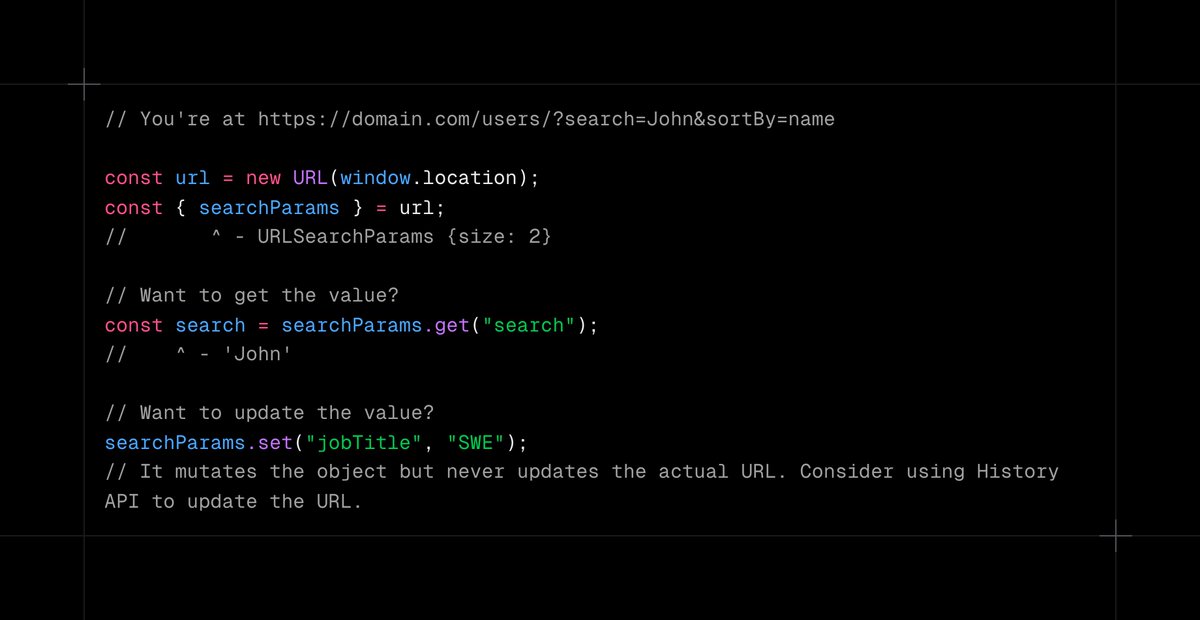 URLSearchParams API
Navigation-friendly
You can freely use browser navigation buttons to switch between states and pages. Want to go back to the previous page? Use the back button. Want to go back to the parent folder? Use the back button. Oh wait, you want to open up that child folder you've been in before? Use the forward button.
Shareable
You can freely share the link with a friend to get to the same exact view as you. Protected resource that you'd like to share? Add a verifiable token. Let the backend do its job. No login required. No long explanations. No demos. Works out of the box.
Of course, it's not a silver bullet. You definitely should not store everything here.
- Dialog open state? Should not be stored (until explicitly required like posts on Instagram)
- Secrets? I hope you know the answer :)
- Resource identity like productId? Consider using path segment instead. (e.g. /products/1 instead of /products?productId=1)
Think about the user experience. Learn browser APIs. Use it for good. Prefer native browser solutions instead of JavaScript ones.
We can make the internet a better place.